
Bring the channels together
Handle supported voice and digital conversations through a shared service experience, with queues and priorities designed around your customers.
A Microsoft solution
Microsoft technology. Expertise from Nemely.
Microsoft Dynamics 365 Contact Center is cloud contact centre software for customer service teams. It brings voice, digital conversations, intelligent routing and AI assistance together, with customer context available wherever the conversation begins.
What is Dynamics 365 Contact Center?
Behind a helpful answer is a team that knows who is calling, why they need help and what has already happened. Contact Center connects the channels, routing and working tools that make that possible.
Handle supported voice and digital conversations through a shared service experience, with queues and priorities designed around your customers.
Use unified routing to match requests to skills, availability and capacity. Define how self-service hands over when a person is needed.
Connect customer information from your CRM and give representatives useful AI assistance while they work through the request.
Explore the Microsoft interface, from the next customer conversation to the team’s operational picture. Select a view, then open the screen to see the detail.
For service representatives
 View full size
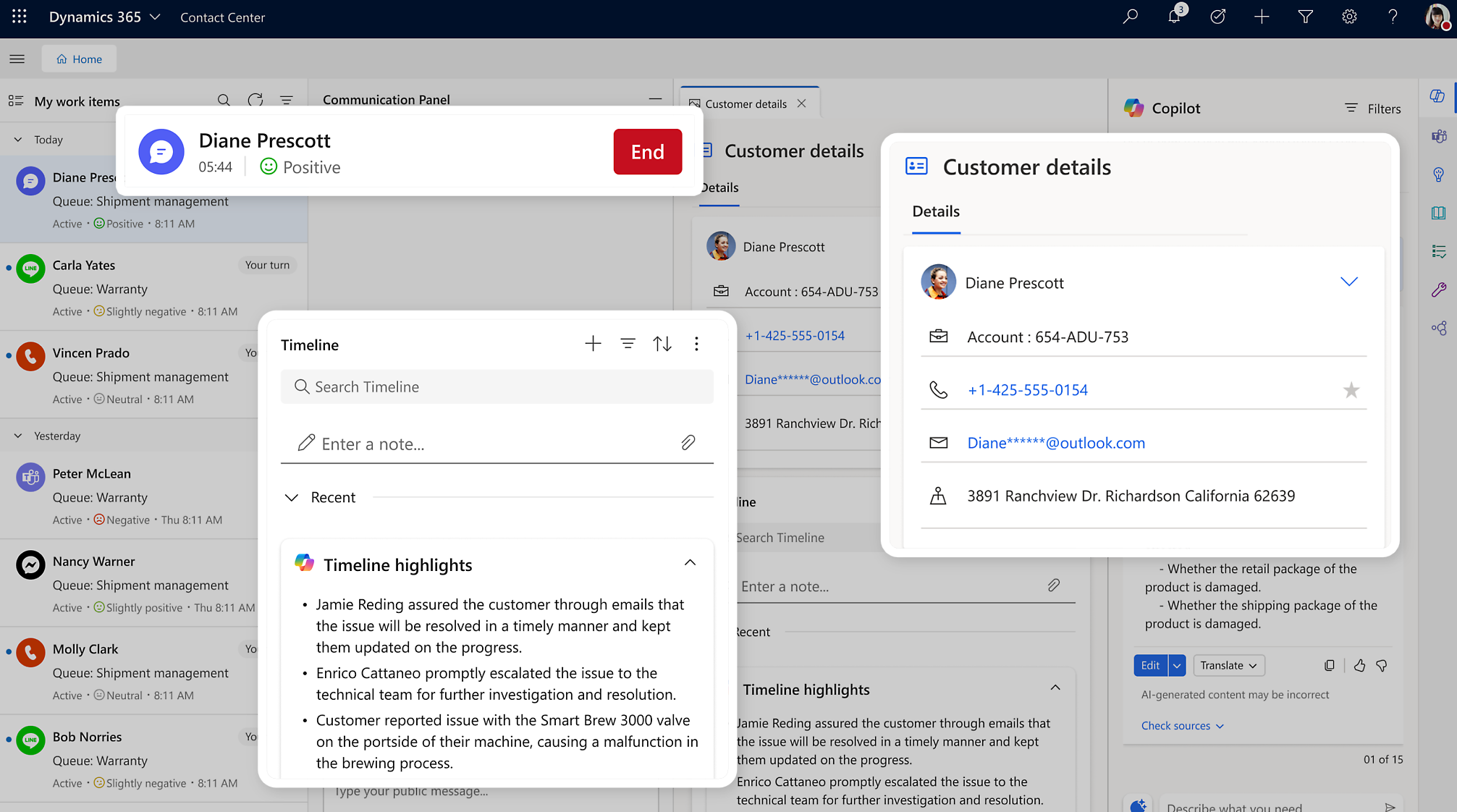
See conversations alongside connected customer details and a timeline. Representatives can work with the information they need without asking the customer to explain everything again.
An active conversation and shared work list bring incoming requests into view.
Customer details and timeline highlights help put the current request in context.
Nemely maps the CRM information, access and integrations needed for your setup.
Copilot in the working day
 View full size
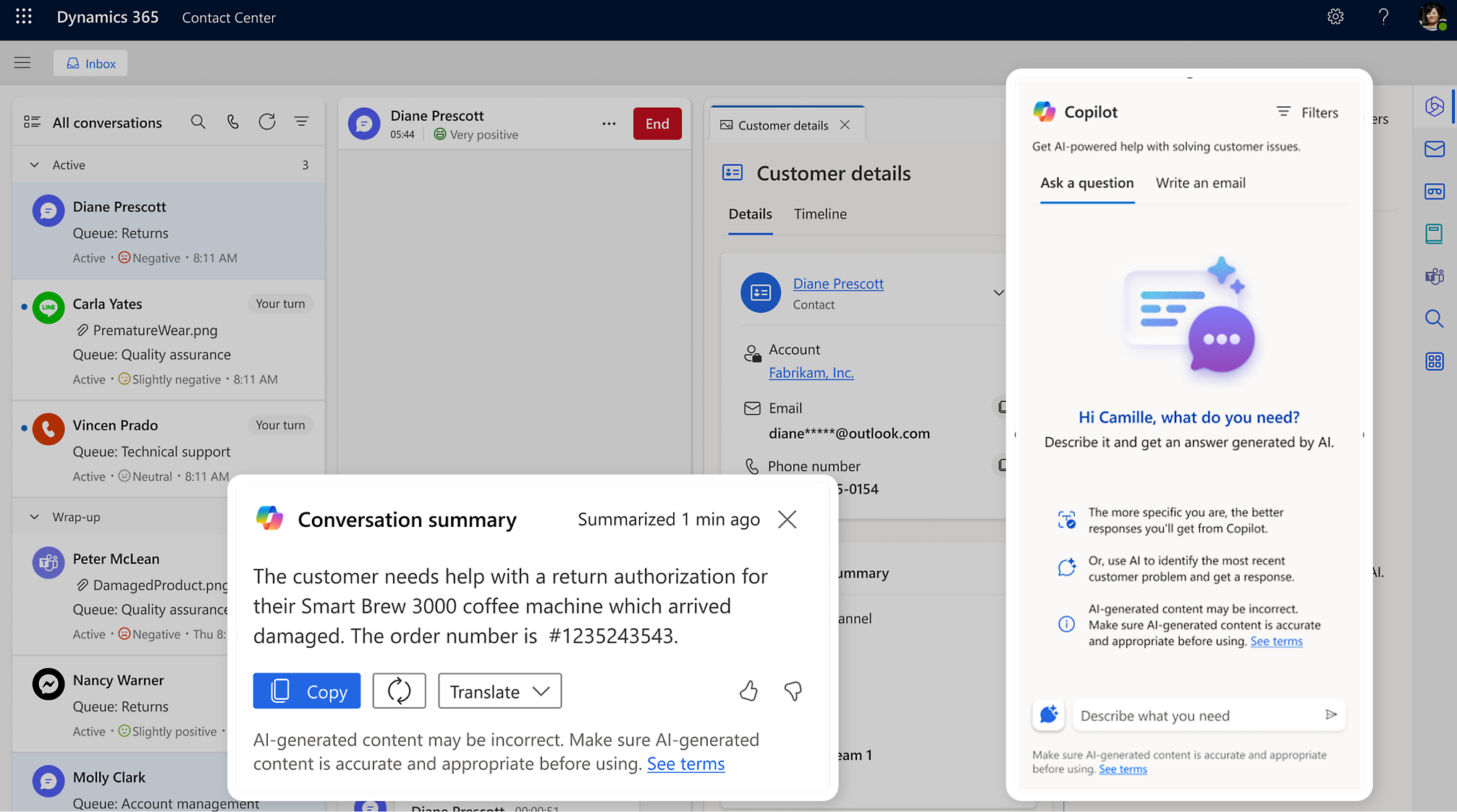
Copilot can summarise a conversation and help representatives find relevant answers. They review the suggestion, check the context and decide how to move the request forward.
Bring the key points together when wrapping up or handing over a conversation.
Ask for assistance while keeping the conversation and customer information in view.
Test answer quality against approved knowledge, permissions and real service scenarios.
For supervisors
 View full size
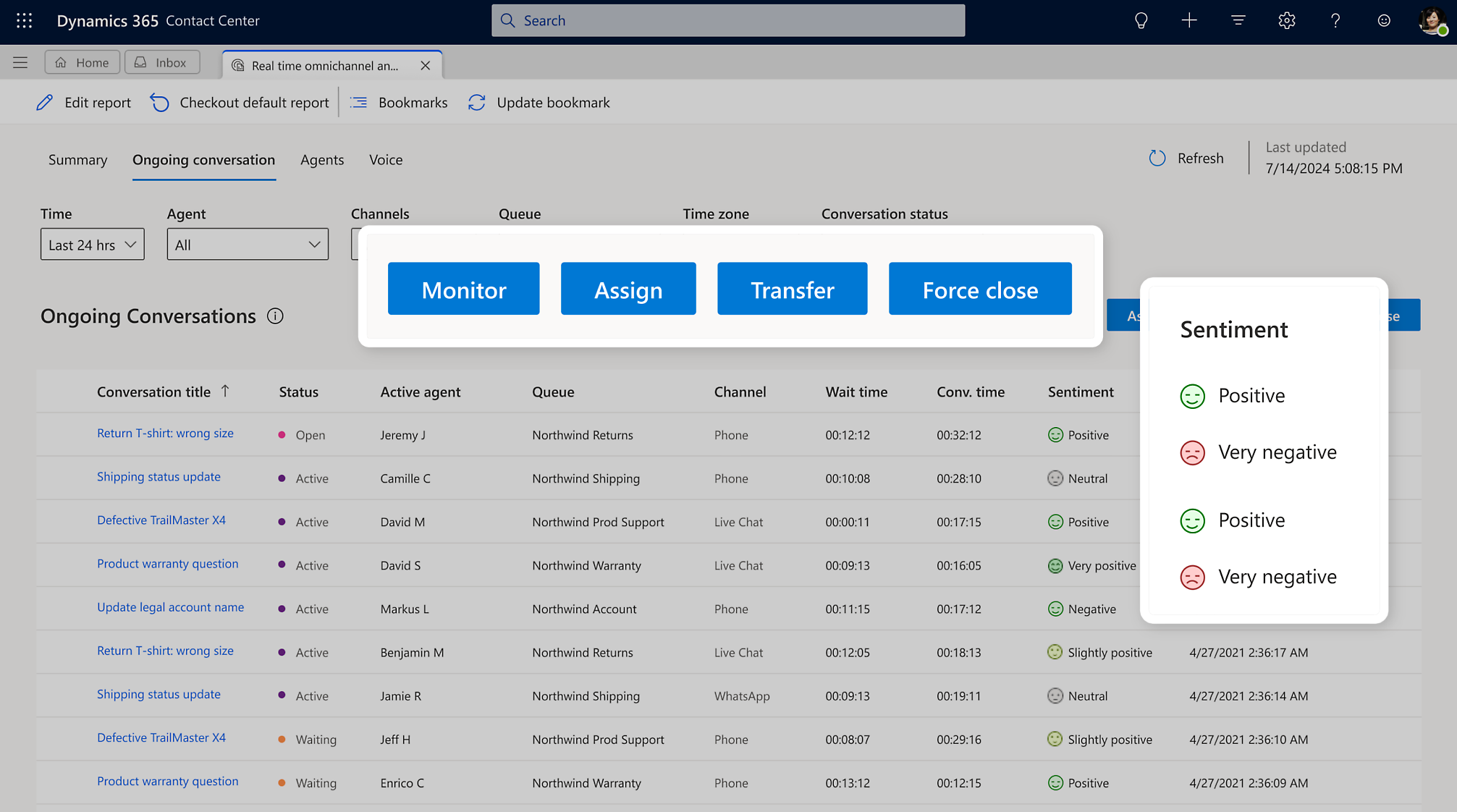
Follow ongoing conversations by queue, channel and status. Authorised supervisors can monitor, assign or transfer work and use available sentiment signals as one input when deciding where to help.
Review active and waiting conversations across the configured channels.
Use supervisor controls to support representatives and manage a handover.
Consider waiting time, conversation status and available sentiment together.
For service leaders
 View full size
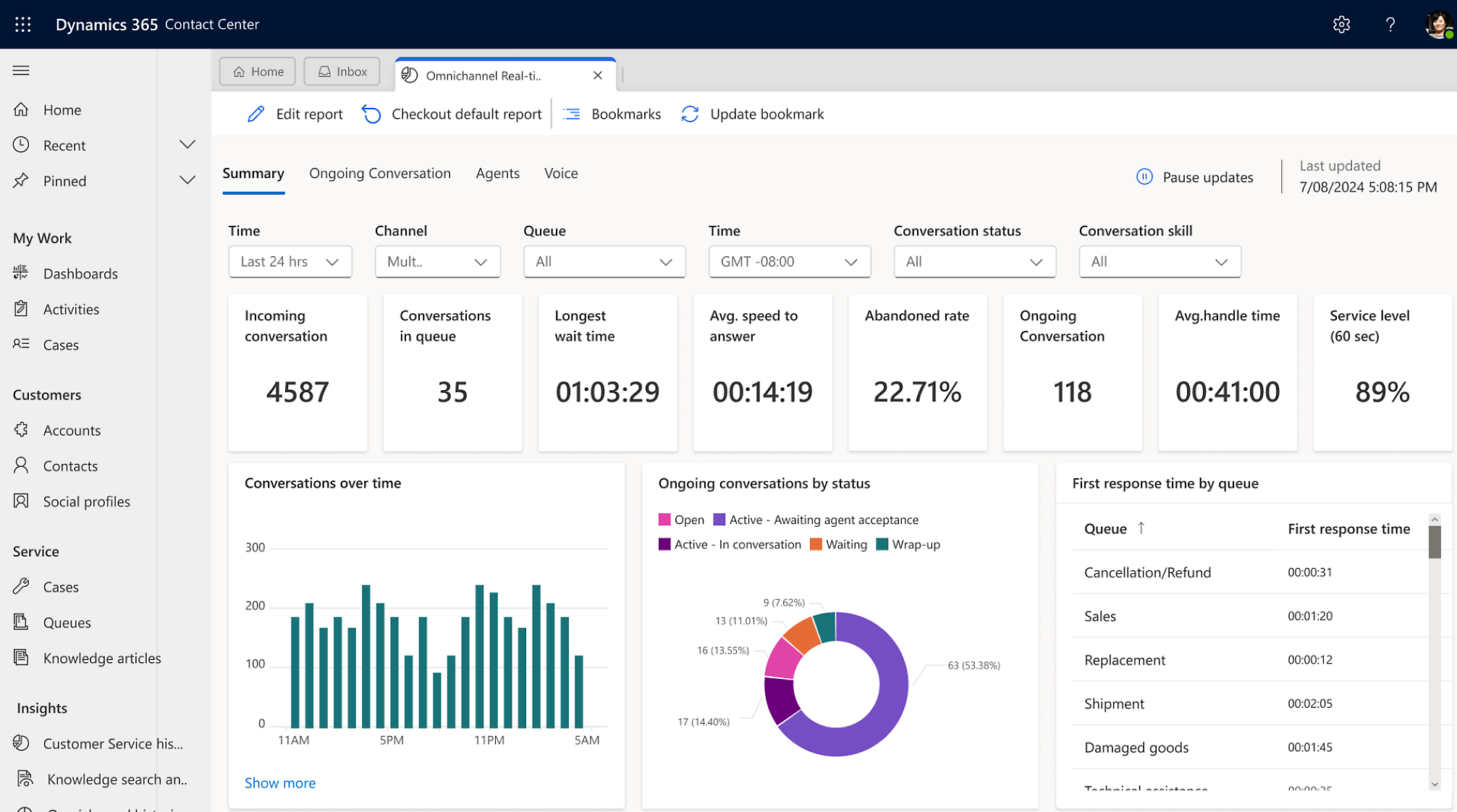
Real-time reporting brings demand, queues and service measures into view. Use the operational picture to spot pressure, review service levels and decide where to investigate.
See incoming conversations, queue volume and the longest waiting time.
Review speed to answer, abandonment and handling time in the configured reports.
Agree which measures matter before a pilot, then compare quality and operating costs.
Official Microsoft product visuals with illustrative data and highlighted interface details. Your workspace and available features depend on licensing, configuration, language and region.
From the first hello
Start with a familiar service request. Design how the conversation, information and responsibility move together.

A supported voice or digital channel starts the conversation.
See the related product viewRouting matches the work to a queue, skill and available representative.
See the related product viewConfigured AI self-service escalates with context when human help is needed.
See the related product viewSupervisors review the workload, handovers and service measures.
See the related product viewHow it fits your business
Contact Center can work with Dynamics 365 or another CRM. The connection still needs to be designed: identifying the customer, bringing in useful information and deciding which system owns each record.
Explore Dynamics 365 Customer ServiceConversations & operations
Voice, digital channels, routing, AI self-service and contact-centre supervision.
Cases & knowledge
Case management and knowledge capabilities that can work alongside Contact Center.
Customer information
An alternative CRM can remain part of the solution, with the right data connections and permissions.
From product to practical use
Nemely helps define the service journey, connect the systems and plan how your people will work with the solution.
Map demand, channels, CRM dependencies and knowledge quality. Agree a baseline for repeat contacts, transfer quality and representative effort, then check licensing, language support and feasibility.
Configure the chosen channels, routing and workspace. Connect customer data and test self-service, permitted actions, transfers and failures with real service scenarios before a controlled pilot.
Train representatives and supervisors, rehearse escalation and agree operational ownership. Compare the pilot with its baseline, review quality and costs, then decide what is ready to expand.
We bring our Dynamics 365, integration and business-process expertise to Contact Center evaluation and delivery. Nemely is developing this capability internally; we agree the readiness, scope and delivery responsibilities with you before committing to a rollout.
FAQs
The questions that help turn product interest into a practical first conversation.
Yes. Microsoft supports Contact Center with other CRM environments as well as Dynamics 365. That still requires integration design: identifying customers, agreeing data ownership, synchronising the information needed in Dataverse and linking back to the source. We assess connectors, APIs, permissions and failure handling for your setup.
Contact Center focuses on voice and digital conversations, routing, self-service and contact-centre operations. Customer Service provides case management and knowledge capabilities. They can be combined, or Contact Center can connect to another CRM. The right choice depends on where your service work and customer records already live.
A configured Copilot Studio agent can answer supported questions and use approved tools for defined tasks. We agree what it may do, how it identifies the customer and when it must escalate. A tested handover passes the conversation and relevant context to a representative; ambiguous or sensitive requests need a clear human route.
No. Start with the channel and service journey where a pilot can give useful evidence. Voice, digital messaging, AI usage and connected systems have different setup and licensing considerations. We verify the required capabilities, regional and language availability before choosing the first scope.
We can assess the business case, design the customer-data connections and work through configuration, integration, testing and adoption. We are actively building our Contact Center capability internally. A scoped evaluation makes technical dependencies and delivery responsibilities clear before you commit to implementation.
Choose measures that reflect the customer and representative experience: time spent finding context, unnecessary transfers, repeat contacts, answer quality and successful handovers. Compare them with the current process alongside operating costs. Faster handling is only useful if the customer’s issue is properly resolved.
Your next step
Tell Stefan where your service conversations lose context. Together, we can explore the channels, CRM connections and first journey worth evaluating.
Talk to Nemely about Contact Center