
























Nemely — CRM starts with us.

What are you looking for?

Browse all pages

Automation

Let your systems carry the handover.

Copying records between CRM, ERP and other applications creates delay and uncertainty. Nemely designs integrations that connect the right information to the next business action, with explicit ownership and a way to see when something goes wrong.

Technology specialist working with code across several displays
DataversePower AutomateConnectors

A few organizations we've worked with

Connected data needs clear agreements.

An integration is a shared responsibility between systems. Define what moves, which record is authoritative and what each team does when the exchange stops.

Data ownership and contracts

Decide what a successful exchange means.

Customer details, orders and service records each have different lifecycles. We map the event that starts an exchange and the result the receiving system must confirm. Stable identifiers, required fields and reconciliation rules make the handover easier to trust and troubleshoot.

  • Identify the authoritative source for each field.
  • Define the change and the expected acknowledgement.
  • Reconcile records that do not match.

Explore integration delivery
Colleagues agreeing how information should be shared during a working session

Dataverse and connected systems

Move data when needed. Read it where appropriate.

Some integrations synchronise records; others expose external information where it is used. Dataverse virtual tables are one option for supported external sources. We assess the available operations, data types, permissions and performance before selecting a connector, virtual table or custom API approach.

  • Choose a pattern for the business requirement.
  • Check connector and source-system limitations early.
Discuss your integration architecture
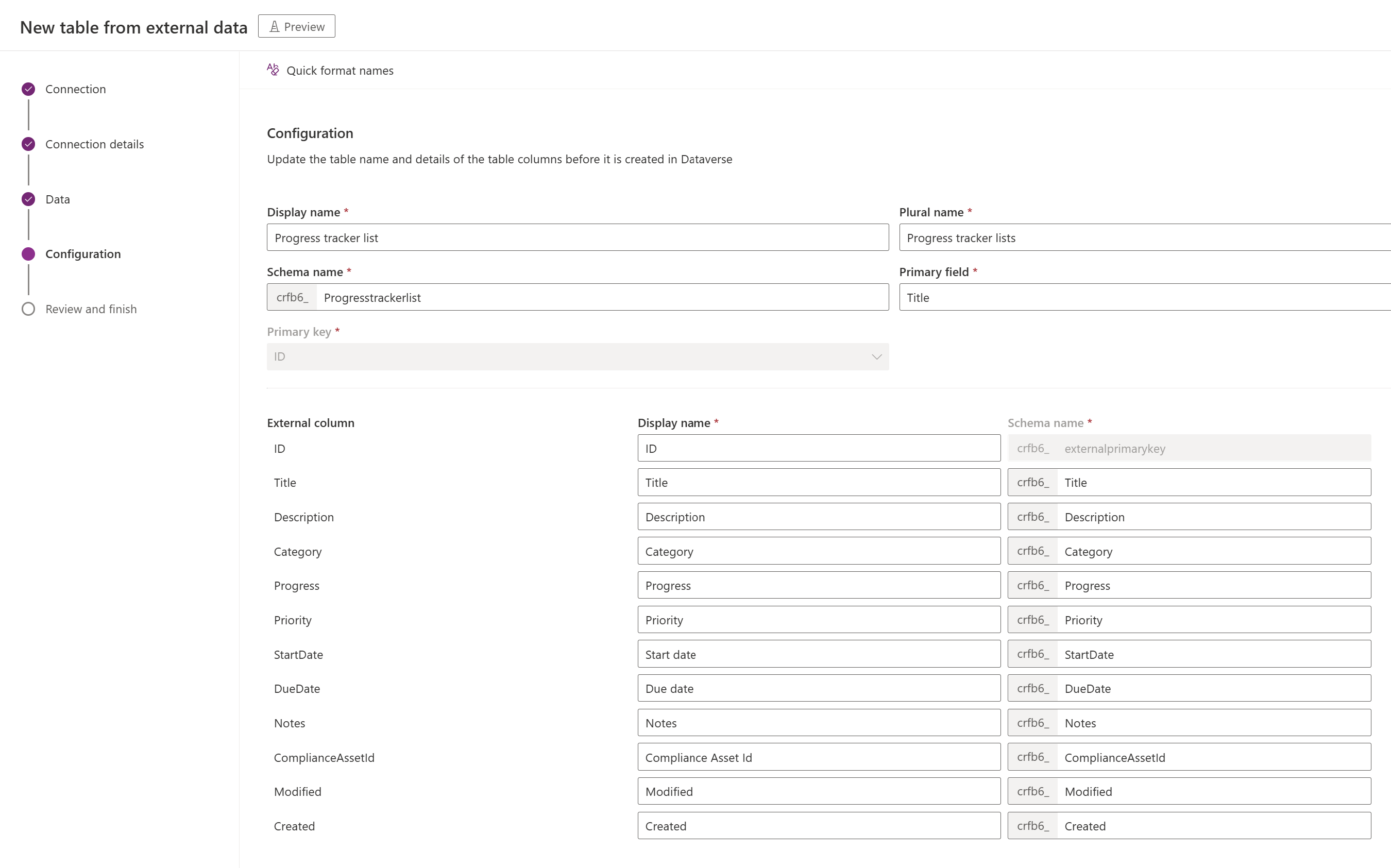
Microsoft virtual table setup showing external column and Dataverse column mappings

Microsoft’s virtual table configuration example. The source image labels this setup experience as Preview; it illustrates field mapping, and availability must be checked for the chosen provider.

Microsoft Learn · virtual tables

Monitoring and recovery

Make an interrupted exchange visible.

An integration needs more than a successful test message. We plan monitoring, support ownership and recovery alongside the mapping. Your team should be able to identify the affected business record, understand the failure and decide whether to retry or correct the data.

Plan integration support
Technology professional discussing an issue during an online call

How Nemely helps

Validate the contract at both ends.

We work with the owners of the connected applications to establish what the integration may read or change and how the exchange will be supported.

Process DesignSystem IntegrationCustom Development

Map records and events

Document source ownership, identifiers, transformations and the event or schedule that starts each exchange.

Test failure and replay

Check unavailable services, incomplete records, duplicates and changed permissions. Verify the result after recovery as well as the initial request.

Define ongoing responsibility

Agree monitoring, credential maintenance and release coordination with the teams who own each system.

FAQs

Your questions, answered.

Is every connection a real-time integration?

No. A scheduled batch, event-driven exchange or direct lookup may each be appropriate. We compare the required freshness of the information with system capabilities, volumes, resilience and operating cost.

Do virtual tables copy data into Dataverse?

Virtual tables present external data through Dataverse without storing the underlying external records as ordinary Dataverse rows. Supported operations and features depend on the provider and source. We check those limits before treating a virtual table as a replacement for synchronisation.

Can you work with systems outside Microsoft?

Yes, where the system exposes suitable APIs, connectors, files or another supported exchange mechanism. We assess access, data formats and vendor constraints, then agree a pattern both application owners can operate.

What affects the cost and timing of an integration?

Available interfaces, data mappings, volumes, security requirements and dependencies on other system owners determine the scope. We agree update frequency, failure handling and test cases before estimating delivery. Connector subscriptions, platform capacity and ongoing monitoring are reviewed alongside the build work.

What should we provide before an integration review?

Identify the systems and their owners, the records that need to move and how quickly they must arrive. Bring interface documentation or vendor contacts where available. Agree a secure way to share representative examples; passwords and production credentials are not needed for the initial conversation.

Explore the Microsoft capabilities

Explore the Microsoft capabilities

Build for today. Keep a view of what comes next.

Microsoft is moving Dynamics 365, Power Platform and Dataverse updates to the AI at Work roadmap from September 2026. We use the current feature status when planning your solution, and evaluate previews separately before proposing them for production.

Explore Microsoft’s roadmap approach

Capabilities reviewed 8 September 2026. Licensing, configuration, language and regional availability vary by feature.

Your next step

Let’s make your next step concrete.

Bring Stefan the two systems that keep making your team copy information. We can discuss the handover, the source of truth and a suitable integration approach.

Contact us
Stefan Christiansson, CEO & Solutions Architect at Nemely, beside a blue-framed window with a city backdrop
Stefan ChristianssonCEO & Solutions Architect

Get resource