

























Nemely — CRM starts with us.

What are you looking for?

Browse all pages

AI at work

Less catching up. More customer understanding.

Before a customer conversation, your team needs the account story and what remains unresolved. Nemely connects Dynamics 365 customer information with useful Copilot assistance, helping sellers prepare, follow up and keep context available to the next colleague.

An account manager with a headset preparing at a laptop beside an orange notebook and mug
Microsoft Dynamics 365 SalesMicrosoft 365 Copilot

A few organizations we've worked with

A better start to the customer conversation.

Begin with a useful summary, check the detail that matters and leave the CRM ready for the next colleague. Each step has a different role in making assistance dependable.

Dynamics 365 in practice

The account story, closer to the record.

Dynamics 365 Sales can surface summaries on account, lead and opportunity records. This expanded opportunity example brings key details into view. We help your team assess which information supports preparation and what still needs to be opened and checked in the record.
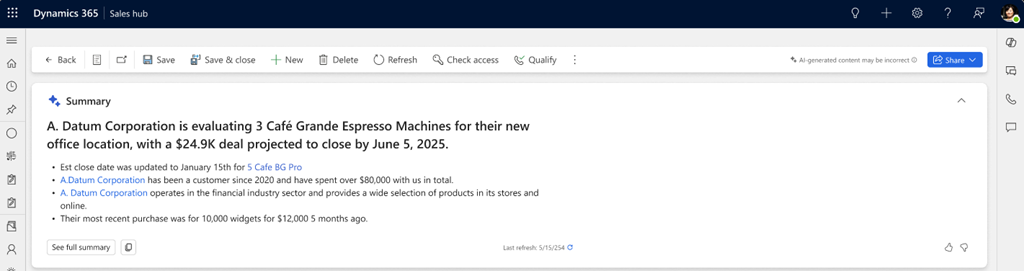
Expanded Dynamics 365 Sales opportunity summary showing account context and key opportunity information

Microsoft’s Dynamics 365 Sales example shows an expanded opportunity summary. The record names and values are demonstration data, not Nemely customer information or performance results.

Source: Microsoft Learn
  • Confirm the customer, opportunity and context before relying on a summary.
  • Check dates, commitments and missing information against the underlying records.
  • Use the summary to prepare the conversation; let the account owner decide the next action.

Explore Dynamics 365 Sales consulting
Account manager checking notebook details against a laptop before updating customer information

The information behind the answer

A missing customer update stays missing.

A colleague may know that a decision has moved, while the opportunity still shows last month’s date. AI cannot make that discrepancy disappear. We review how activity, ownership and customer commitments are recorded, then simplify the habits and fields that keep the CRM useful.

Strengthen the data behind CRM

Adoption in real customer work

Introduce assistance at a moment people recognise.

Choose a recurring moment: preparing for an account review, checking an opportunity or recording the agreed follow-up. We work with a small group of users to learn where assistance saves effort, where it causes rework and how to make review a natural part of the routine.

Plan adoption around everyday work
Two colleagues practising a customer-work routine together at a laptop

How Nemely helps

Fit AI into the way your team serves customers.

Nemely connects application setup, CRM data and everyday sales habits. We review Dynamics 365 Sales and Microsoft 365 Copilot together, configure the appropriate experience and test whether it reduces preparation and follow-up effort.

Solution Health ChecksUser AdoptionCRM Implementation

Choose a customer-facing moment

Identify a recurring task and the people who perform it. Agree the record types and information needed for a worthwhile pilot.

Prepare the records and access

Review activity capture, ownership, permissions and relevant configuration. Resolve the information gaps most likely to undermine the selected task.

Coach users and review the result

Demonstrate the capability using realistic examples. Gather feedback on useful outputs, missed context and review effort before extending access.

Planning notes

Planning CRM assistance that people will use

Choose the right sales assistance experience

Sales agent in Microsoft 365 Copilot can bring together CRM information and permitted Microsoft 365 context for account summaries, meeting preparation and follow-up. It is the evolution of the Copilot experience for sales teams. We check licensing, connected data and the experience available to your users; the Dynamics 365 record-summary example above does not represent every Sales agent feature.

Measure the whole preparation task

Observe the time spent preparing and checking, not just generating a response. Ask users which important facts were missing and whether they had to redo the work. The useful measure is better preparation with acceptable review effort, assessed on representative customer records.

FAQs

Your questions, answered.

Does this replace our CRM process?

The aim is to improve a particular moment within it. Customer ownership, qualification, commitments and approval responsibilities still need to be explicit. We introduce assistance where it supports those responsibilities and adapt the process only when the business case is clear.

Will every Dynamics 365 user see the same AI features?

No. The experience depends on the application, enabled capabilities, user access, environment and entitlement. Microsoft also changes experiences over time. We verify the relevant configuration and licensing rather than assuming one demonstration will match every user’s screen.

What if our team needs help across several systems?

First establish whether Dynamics 365 and the Sales agent in Microsoft 365 Copilot address the task with the connected information available. If the process needs additional sources or actions, a Copilot Studio agent or integration may be appropriate. We define that extra scope around the customer journey.

What affects the scope and timing of CRM assistance?

The selected tasks, available capabilities, licences, record quality and access requirements shape the work. We agree which users will try the assistance, how they will check its output and what needs configuration or integration before planning a wider rollout.

What should we bring to an initial review?

Bring an example of the preparation, follow-up or recordkeeping task that takes time today. Identify the people doing it and the information they use. That gives us a practical basis for comparing existing assistance with configuration or a separately scoped agent.

Explore the Microsoft capabilities

Explore the Microsoft capabilities

Build for today. Keep a view of what comes next.

Microsoft is moving Dynamics 365, Power Platform and Dataverse updates to the AI at Work roadmap from September 2026. We use the current feature status when planning your solution, and evaluate previews separately before proposing them for production.

Explore Microsoft’s roadmap approach

Microsoft capabilities reviewed 6 October 2026. Licensing, configuration, language and regional availability vary by feature.

Your next step

Let’s make your next step concrete.

Bring Stefan the customer task your team spends too long preparing for. We can review the CRM context and identify a useful first application of AI assistance.

Contact us
Stefan Christiansson, CEO & Solutions Architect at Nemely, beside a blue-framed window with a city backdrop
Stefan ChristianssonCEO & Solutions Architect

Get resource