An approval should not depend on remembering who to chase. Nemely builds Power Automate workflows that connect triggers, decisions and updates, with a visible route for the cases that need someone’s attention.
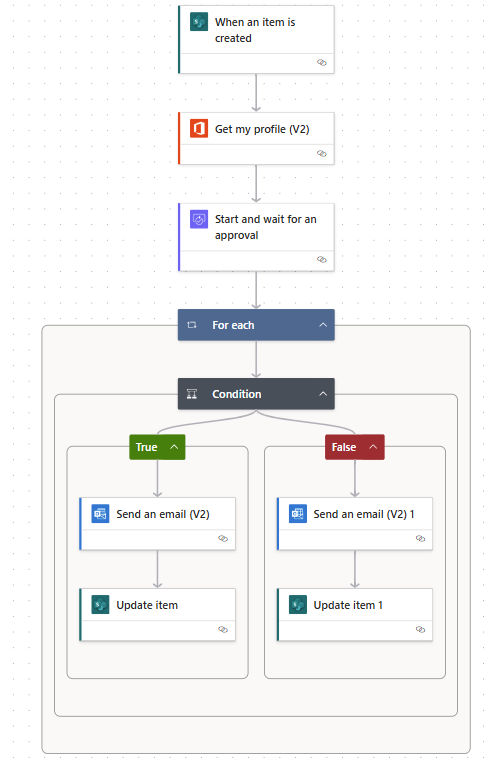
Microsoft’s completed approval flow in the new designer. The example updates a SharePoint item after the approval decision; your flow follows your own rules and destinations.
Build a flow around the business decision, including the incomplete requests, delays and retries that happen outside the happy path.
Power Automate cloud flows
See what happens after approve—or reject.
Power Automate can send an approval request and continue the flow when a response is received. Microsoft’s example shows a request splitting into approval and rejection branches. We define the record updates, notifications and evidence your process needs on each path.
A missing approver, changed connection or duplicate trigger can interrupt otherwise simple automation. We design exception handling with the people who will operate it, including how to notify a responsible owner and when a request can safely be tried again.
Detect a failed or overdue step.
Explain what needs a person’s attention.
Resume without repeating a completed business action.
The process owner should know what the flow does and who maintains it. We document the business rules, connections and support responsibilities, then package changes for a controlled release. Your team gets a working process and a way to keep it working as requirements change.
Identify the triggering event, required fields, approvers and the conditions that determine the next action.
Test every meaningful branch
Try approved, rejected, incomplete and overdue requests. Check the outcome in connected systems and the information sent to each person.
Hand over the operating routine
Agree who monitors runs, updates connections and approves changes. Document the steps needed to investigate and recover an interrupted request.
FAQs
Your questions, answered.
Can approvals work with SharePoint or Dynamics 365?
Power Automate supports approval workflows across connected services, including SharePoint and Dynamics 365. We check the relevant connectors, permissions and licensing for the exact records and actions in your process.
What happens if an approval takes a long time?
Long-running approvals need a deliberate design because flow runs and individual actions have limits. We agree the required duration, reminders and escalation behaviour, and choose a pattern that can retain the business decision across that period.
Can a workflow send a duplicate update?
Retries and repeated triggers can produce duplicate actions unless the solution handles them. We assess where a request needs a stable identifier, whether an action is safe to repeat and how completed work is recognised before another update is made.
What affects the cost and timing of a workflow project?
The number of systems, approval paths, exceptions and audit requirements determine the effort. We review connector and licensing needs, then agree testing, monitoring and ownership. A simple demonstration does not include all the failure recovery and support needed for everyday use.
What should we prepare before automating an approval?
Identify who requests, decides and follows up, including delegates and escalation owners. Bring examples of normal requests, rejected requests and missing information. Agree what should happen after each decision so the workflow covers the handover as well as the approval itself.
Your next step
Let’s make your next step concrete.
Show Stefan one approval or recurring task that keeps getting stuck. We can work through the rules, the exceptions and what a reliable flow would need.