

























Nemely — CRM starts with us.

What are you looking for?

Browse all pages

AI at work

From incoming documents to usable information.

A workflow cannot act on information it has not understood. Nemely combines AI Builder with Power Automate to extract document content, check the result and route exceptions to the people who can resolve them.

An operations specialist in an orange cardigan reviewing a paper document beside a laptop
Microsoft AI BuilderPower AutomateMicrosoft Dataverse

A few organizations we've worked with

Interpret the document. Control the process.

Document automation has three separate responsibilities: extracting information, deciding whether it is acceptable and completing the business operation. Design each one deliberately.

AI Builder in Power Automate

Give the workflow fields it can work with.

The Process documents action uses a published AI Builder document processing model to extract fields and tables. Microsoft’s example passes file content into an invoice extraction model. We configure the model and map its outputs to the information your process actually requires.
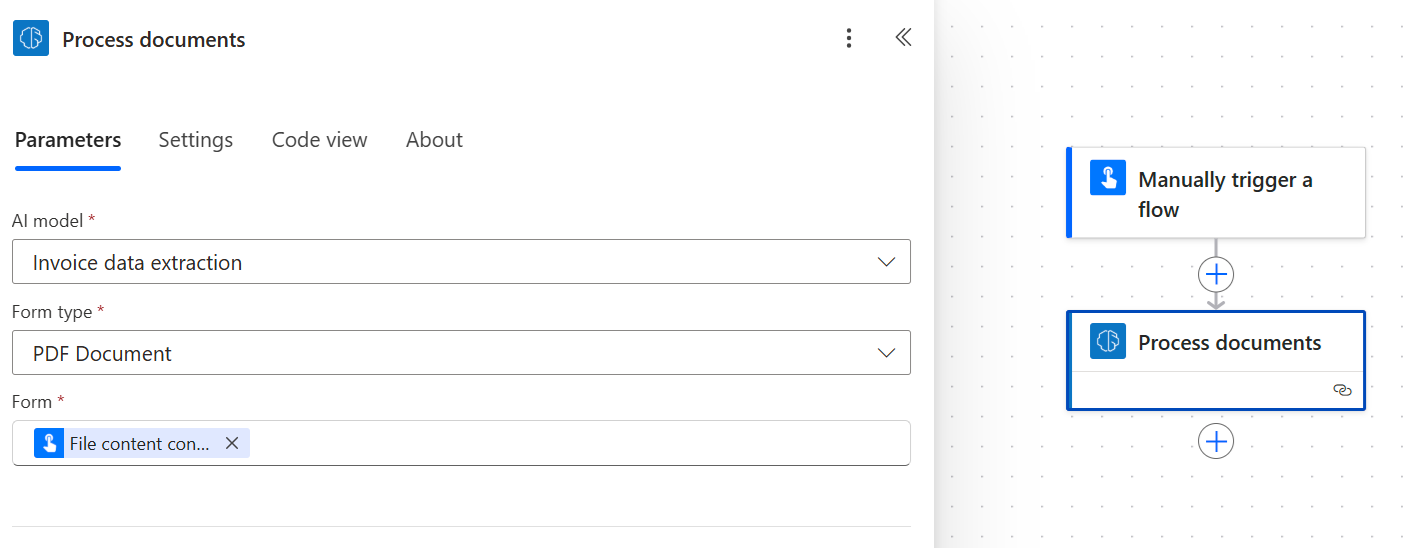
Power Automate Process documents action with an invoice data extraction model and file content input

Microsoft’s flow example configures AI Builder’s Process documents action with a model and an input file. It demonstrates extraction setup, not automatic business approval or a guaranteed processing result.

Source: Microsoft Learn
  • Train and assess the model with document examples that reflect real variation.
  • Keep the original document available alongside the extracted values.
  • Use confidence information as one review signal, alongside business validation.

Build an intelligent document workflow

Validation & human review

The unusual document deserves a clear route.

A missing supplier, a duplicate reference or a total that does not reconcile needs a business decision. We separate those checks from extraction and design a review queue that shows the source document, the proposed values and the reason the item stopped.

  • Validate required fields, formats and relevant business relationships.
  • Route uncertain or inconsistent results to the right reviewer.
  • Record the correction and outcome before the process continues.
Create the review experience in Power Apps
A professional seated at a computer keyboard in a bright office
Four colleagues walking through a shared office, one wearing an orange shirt

Connected business work

An extracted value is only the beginning.

The real result might be an approved invoice, a registered request or an updated business record. Nemely connects the accepted information to the next system and designs for duplicate submissions, failed updates and support handover. The people downstream should understand what has been processed and what still needs attention.

Connect the next steps with Power Automate

How Nemely helps

Make the exception path part of the first release.

We build around your document variations and business rules, connecting extraction, review and system updates. The goal is less rekeying and fewer stalled handovers, with a clear route for the exceptions that still need a person.

Process DesignCustom DevelopmentSystem Integration

Inspect the document sample

Identify formats, variations, expected fields and the destination for each value. Include poor-quality scans and incomplete documents in the discussion.

Implement extraction and review

Configure the model, flow and validation steps. Give reviewers enough context to accept, correct or reject an item without searching elsewhere.

Prove processing and recovery

Test repeated intake, unavailable connections and failed updates. Agree ownership for the model, workflow, review queue and operating costs.

Planning notes

Designing for the documents you actually receive

Illustrative workflow: a supplier invoice

A document arrives through an agreed intake channel. The model proposes key values, the workflow checks required information and an authorised reviewer resolves exceptions before the accepted data moves on. The exact accounting connection and approval policy depend on your systems. This is an implementation example, not a measured customer case.

What to measure during a document pilot

Use both typical and difficult documents. Measure field correctness, manual rekeying, turnaround time and duplicate handling across the whole process. Track where a person intervenes and why. Compare the result with today’s workflow; a model confidence score alone does not establish that a value is correct for the business.

FAQs

Your questions, answered.

When is AI Builder useful instead of ordinary workflow rules?

When the process needs information from varying document content, extraction can provide fields that rules can then evaluate. If the input is already reliably structured, conventional mapping and validation may be enough. We assess the input before introducing AI processing.

Can a high confidence score bypass all review?

A confidence value describes the model’s extraction assessment; it does not verify a supplier, approve a payment or prove that a total is acceptable. Thresholds should be evaluated using your documents and combined with business checks and the required approval policy.

Do we have to replace our existing business system?

Document processing can sit in front of an existing system. The integration depends on its supported interfaces, identity model and validation requirements. We review the available connection and failure handling before promising an automated update.

What affects the cost and timing of a document-automation pilot?

Document variation, extraction fields, validation rules, review steps and target-system access affect the effort. We also check the processing entitlement and capacity for the proposed volume. The pilot should use a representative sample before a wider rollout is estimated.

What examples should we use to test document automation?

Include common layouts and difficult cases such as missing fields, unclear scans and documents that should be rejected. Agree how to handle sensitive information before sharing samples. Record the correct outcome so the pilot can be assessed against business checks as well as extraction quality.

Explore the Microsoft capabilities

Explore the Microsoft capabilities

Build for today. Keep a view of what comes next.

Microsoft is moving Dynamics 365, Power Platform and Dataverse updates to the AI at Work roadmap from September 2026. We use the current feature status when planning your solution, and evaluate previews separately before proposing them for production.

Explore Microsoft’s roadmap approach

Microsoft capabilities reviewed 6 October 2026. Licensing, configuration, language and regional availability vary by feature.

Your next step

Let’s make your next step concrete.

Show Stefan the document that slows the process down. We can help you map the information, checks and connections needed for a practical automation pilot.

Contact us
Stefan Christiansson, CEO & Solutions Architect at Nemely, beside a blue-framed window with a city backdrop
Stefan ChristianssonCEO & Solutions Architect

Get resource