Give your agent a useful job. And the tools to do it.
An AI agent needs more than a good prompt. Nemely designs Copilot Studio agents around a specific task, trusted information and controlled connections—then tests what happens when the conversation takes an unexpected turn.
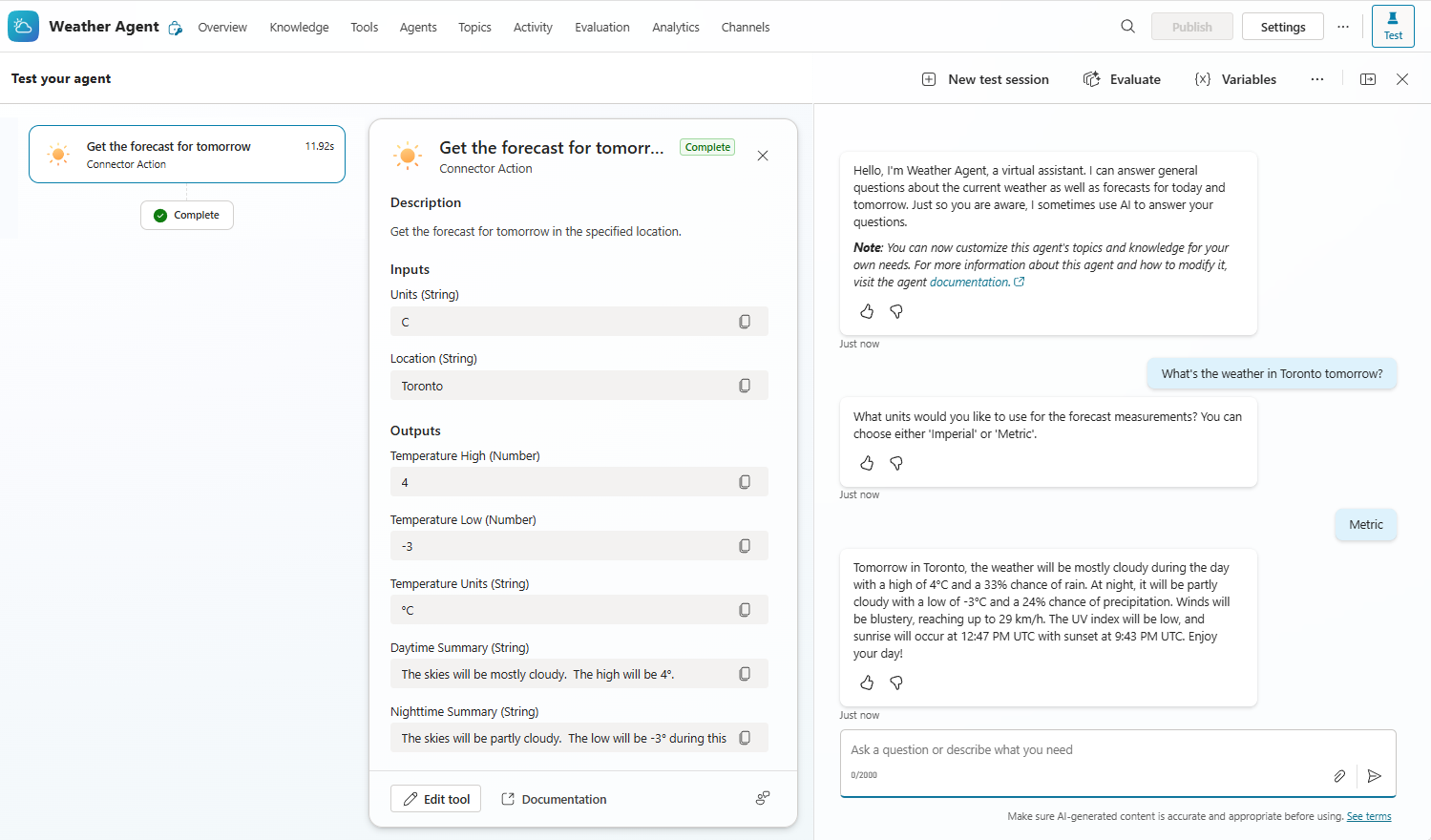
Microsoft’s sample weather agent shows a tool call and its inputs and outputs. This is an illustration of the activity map for generative orchestration, not a Nemely customer integration.
Microsoft Copilot StudioBusiness connectorsMicrosoft Power Platform
A few organizations we've worked with
From a conversation to a working agent.
Define the responsibility first. Connect trusted information and business context, limit the permitted actions and decide when a person should take over. The result should be a task completed with less chasing.
Purpose & boundaries
What should the agent finish for someone?
Take an internal request: a colleague asks how to replace a damaged device. A useful agent might explain the policy, gather the missing details and prepare a request. We specify that complete journey, including what it must never infer and when an existing support team should take over.
Name the intended user and the task they are trying to finish.
Identify the authoritative source for each answer.
Define the action boundary and the route to human help.
Generative orchestration lets an agent select configured tools and knowledge to handle a request. Copilot Studio’s activity map helps makers inspect the resulting tool inputs and outputs. The weather example below illustrates that inspection; business actions also need permissions, validation and a clear failure route.
Write tool descriptions that make the purpose and required inputs clear.
Enforce access and validation in the connected system, with explicit confirmation for consequential actions.
Test incomplete requests, failed connections and unexpected responses before release.
People need to know what the agent can do and how to report a problem. We agree a release process, review recurring failures and make knowledge maintenance someone’s responsibility. A change to a document, tool or instruction becomes a reason to run the relevant tests again.
Nemely brings process understanding, Microsoft application expertise and integration work into one implementation. The design must make sense to the person asking for help and the team receiving the resulting work.
Work through successful, incomplete and unsupported requests with the business owner. For an agent started by a system event, define the expected input and result without assuming someone is present to answer questions.
Configure and connect the agent
Set up instructions, knowledge and tools in the appropriate environment. Apply the permissions and validation required by each connected action.
Test, introduce and improve
Review runs with makers and business users. Document known limitations, support ownership and a repeatable way to assess changes.
Planning notes
Questions to settle before an agent goes live
Knowledge access and useful citations
Begin with a maintained collection of material rather than every available document. Agree who can see it, how conflicting guidance is resolved and what the user should be able to check. Test the behaviour with the identities and access arrangements intended for deployment.
Illustrative use case: an internal service request
A device-support agent could gather missing details and prepare an authorised request for confirmation. An event-triggered agent could instead pick up a newly submitted request and route it for review. We assess the trigger connection’s identity and permissions, prevent repeat submissions and define how failures reach a person. These are design examples, not reported customer results.
FAQs
Your questions, answered.
How is a Copilot Studio agent different from a workflow?
A workflow follows designed conditions and actions. With generative orchestration, a Copilot Studio agent can choose among configured knowledge, tools and topics to address a request. Event triggers can start autonomous agents when something changes in a connected system. We combine these approaches where useful, keeping important business rules and approvals explicit.
Can an agent update Dynamics 365?
An agent can be connected to business actions that interact with Dynamics 365, subject to the integration, identity and permissions you configure. We define allowed changes, validate the inputs and decide where confirmation or approval is needed. Permission to answer a question should not automatically imply permission to change a record.
Can we start with an employee-facing agent?
Yes. A focused internal audience can make it easier to collect relevant questions and feedback. Internal use still needs appropriate access and a clear support route. The first release should have a named owner and a practical way to judge whether it helps people finish their task.
What affects the cost and delivery time of an agent?
The knowledge sources, actions, access model, channels and testing needed shape the implementation. Product entitlement and usage capacity also need review. We scope a focused task and agree evaluation, ownership and support before estimating rollout; a demonstration alone does not establish production readiness.
What should the first agent pilot include?
Choose one task with a clear user group and an accountable owner. Provide representative questions or requests, the approved information sources and examples of when the agent should ask a person for help. Agree how to check answers and actions before expanding access.
Your next step
Let’s make your next step concrete.
Have an agent idea that needs to connect to real work? Talk with Stefan about the task, the systems involved and the first conversations worth testing.