
























Nemely — CRM starts with us.

What are you looking for?

Browse all pages

Automate Work and Processes

Less chasing. More work moving.

Approvals sit in inboxes. People copy the same information between systems. Important work waits for someone to notice. Nemely helps you redesign these moments with Microsoft Power Platform, combining focused apps, reliable workflows and connected data.

Four colleagues discussing work around an open laptop in an office corridor
Power AutomatePower AppsDataverse

A few organizations we've worked with

See the work flow.

Different problems need different building blocks. Start with what slows the work down, then choose the combination that makes the next action clear.

Power Automate

Give routine work a next step.

When the rules are understood, a workflow can route a request, seek a decision and update the right record. We make the triggers and exceptions explicit so the process has a way forward when an approval is late or information is missing.

  • Receive a complete request.
  • Apply the agreed decision rules.
  • Confirm the outcome and handle exceptions.

Explore workflow automation
Two colleagues reviewing a task together at a laptop
Specialist working at a large desktop display in a bright office

Power Apps

Give people a better way to do the job.

A spreadsheet often carries a process long after it has outgrown the task. A focused business app can give people the forms, validation and work views they need, while making ownership clearer. We design the app around the role and the information behind it.

Explore Power Apps

Connections and visibility

Keep the whole operation in view.

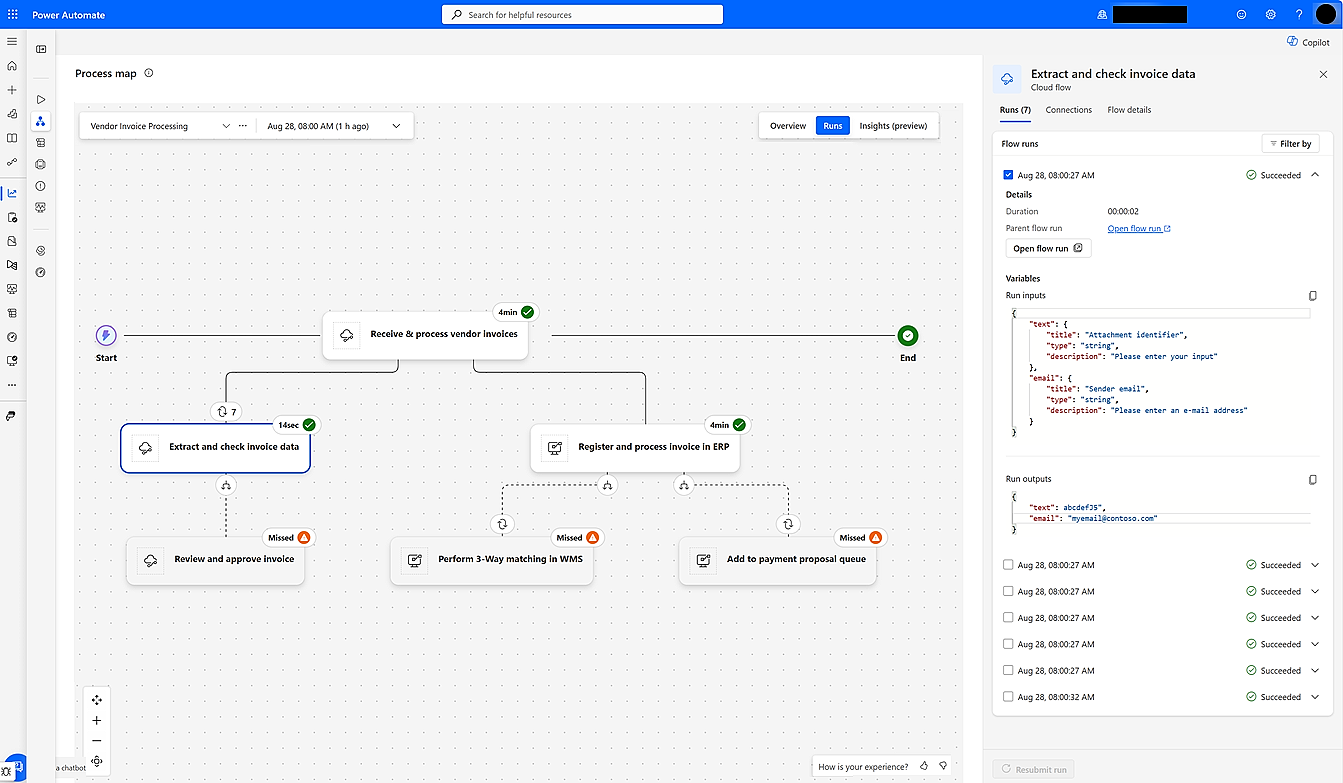
Automation is easier to support when teams can see how its parts depend on each other. Microsoft’s Automation Center process map illustrates those relationships. We plan data ownership, system connections and monitoring together, so an interrupted handover can be found and dealt with.

  • Connect the source and destination deliberately.
  • Give failures a support owner and a recovery path.
Explore system integrations
Power Automate Automation Center process map with connected cloud and desktop flows

Microsoft’s Automation Center process map example, showing automation dependencies and a selected flow run. Sample records illustrate monitoring rather than a Nemely customer result.

Microsoft Learn · automation monitoring

Process discovery

Find the delay before adding more automation.

Some work needs a simpler rule or fewer approvals before it needs a new tool. We combine conversations with process owners and available process evidence to identify the changes most likely to help. That makes the technology investment easier to prioritise and measure.

Explore process modernisation
Facilitator discussing a process sketch with colleagues

How Nemely helps

Make the first improvement small enough to prove.

Choose a process with a recognisable delay, a person responsible for the outcome and enough real examples to test the proposed change.

Process DesignSystem IntegrationCustom Development

Find the friction

Walk through the work with the team and identify repeated entry, waiting time, unclear decisions and avoidable handovers.

Choose the building blocks

Decide whether the problem needs a workflow, an app, an integration or a simpler process. Agree the operating cost and support model.

Release and observe

Run a controlled pilot, test exceptions and compare the actual result with the original problem before widening the scope.

FAQs

Your questions, answered.

Do we need Power Apps and Power Automate together?

Some solutions need only a workflow, while others also need a user interface or a new data model. We select the building blocks for the process rather than requiring a fixed bundle of products.

How do you choose a first automation project?

We look for useful business impact, manageable dependencies and rules people can explain. A high-volume task is not automatically the best starting point if the underlying process or data is still unstable.

Can AI be part of the process?

AI can be evaluated where the input needs interpretation, such as understanding a document or drafting a response. We separate those probabilistic tasks from deterministic business rules and define when a person must review the result.

Explore the Microsoft capabilities

Explore the Microsoft capabilities

Build for today. Keep a view of what comes next.

Microsoft is moving Dynamics 365, Power Platform and Dataverse updates to the AI at Work roadmap from September 2026. We use the current feature status when planning your solution, and evaluate previews separately before proposing them for production.

Explore Microsoft’s roadmap approach

Capabilities reviewed 8 September 2026. Licensing, configuration, language and regional availability vary by feature.

Your next step

Let’s make your next step concrete.

Bring Stefan a process that involves too much waiting or repeated work. We can explore which change would make the biggest practical difference.

Contact us
Stefan Christiansson, CEO & Solutions Architect at Nemely, beside a blue-framed window with a city backdrop
Stefan ChristianssonCEO & Solutions Architect

Get resource