Bring data preparation and analytics closer together with Microsoft Fabric. Nemely helps you choose a focused workload, connect it to your existing estate and establish the operating practices it needs.
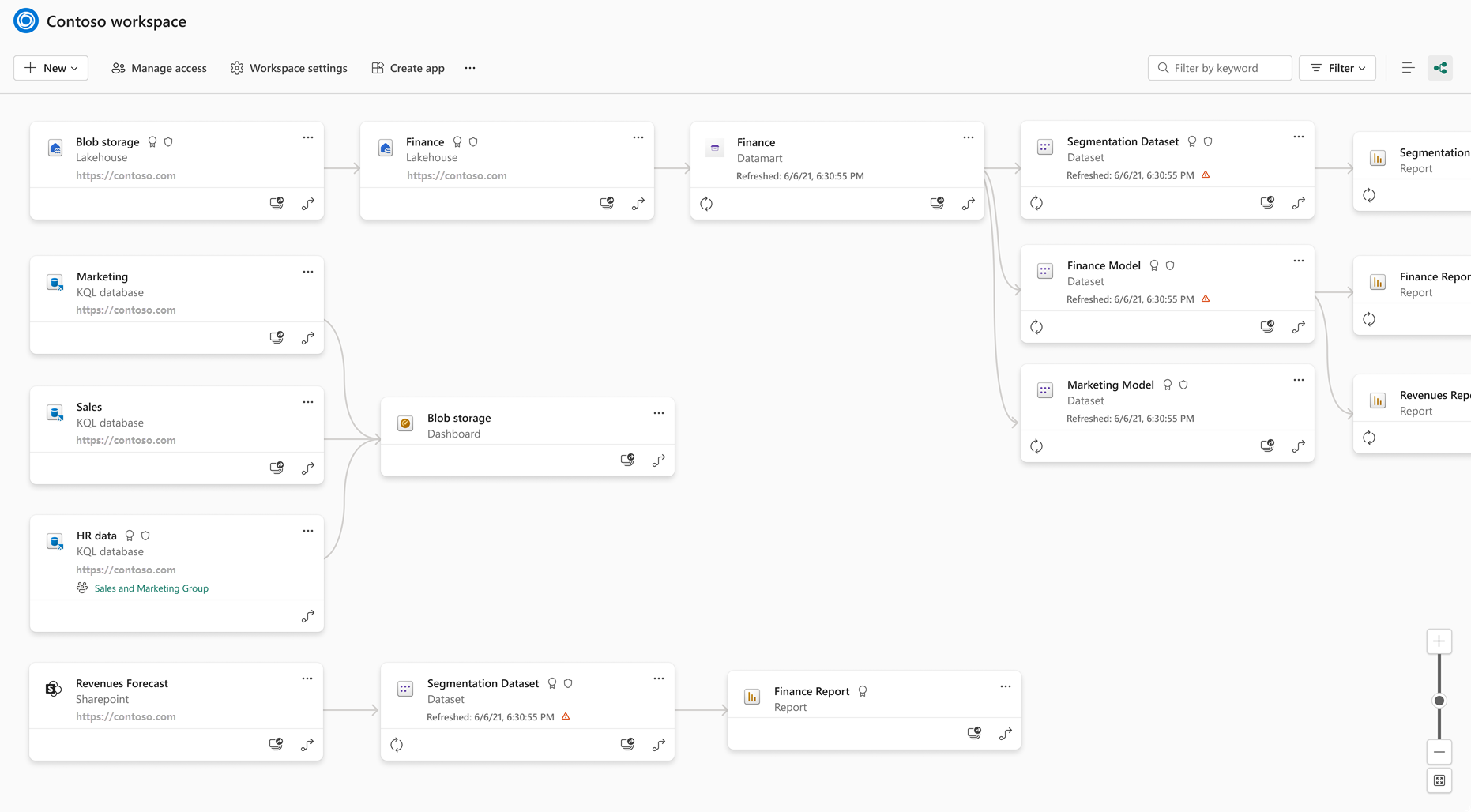
Microsoft documentation example: Fabric workspace lineage with demonstration items. Available relationships depend on item types, connections and permissions; this is not a complete map of every enterprise dependency.
A shared platform is valuable when it makes a real data product easier to deliver and maintain. Start with the route from a source system to a business user.
Architecture with a purpose
Which data deserves a shared foundation?
Repeated extracts, disconnected transformations and unclear ownership can make every report a new integration project. We assess those dependencies with your team and choose a first workload where shared preparation and storage will make a practical difference.
Map the source and its update pattern.
Choose a lakehouse or warehouse approach for the workload and team.
Define the curated output that reporting will use.
Fabric’s lineage view shows connections between items in a workspace, with upstream context. It gives technical teams a way to investigate a dependency before changing an input or troubleshooting a stale report.
Trace the selected item through its visible upstream and downstream relationships.
Use impact analysis when you need to investigate downstream items in other workspaces.
Keep source documentation alongside lineage; the view has connection-specific limits.
A working pipeline still needs an owner. We define how your team monitors refreshes, manages changes, reviews access and tracks capacity use. Start with an operating routine your people can sustain, then extend it as more workloads move onto the platform.
A small end-to-end workload is more useful than a broad platform setup with no business consumer. We agree the scope, demonstrate the data flow and put operational responsibility in place.
Review sources, downstream reports, current skills and the constraints that shape storage, integration and access.
Implement a first data product
Build ingestion and transformation through to the agreed consumer. Validate the result and test recovery from a representative failure.
Establish the operating model
Assign technical ownership, document deployments and monitoring, and review capacity use before scaling to additional workloads.
Planning notes
Questions for a Fabric architecture review
Where OneLake fits
OneLake is Fabric’s shared logical data lake. Fabric combines data integration, engineering, warehousing and reporting experiences around the platform. We evaluate the practical data flow and permissions for your workload instead of assuming every source should be moved.
What AI assistance changes
Fabric includes Copilot assistance for supported development and analysis tasks. We treat generated queries or code as work to review and test, with eligibility and configuration checked for the specific workload.
FAQs
Your questions, answered.
Does Microsoft Fabric replace Dynamics 365 or our ERP?
Fabric serves analytics and data workloads. Your operational systems can continue to run their business processes. We design the integration and refresh approach around which data analytics needs from them.
Do we have to move all our data at once?
No. A phased approach can start with one source domain and one consuming report. Decisions about reuse, copies and integration depend on source support, access needs and performance.
What affects the effort, timing and capacity we will need?
Source complexity, transformations, data volumes, usage and freshness requirements shape the work and capacity assessment. Timing also depends on source access and agreement on the information consumers need. A representative pilot helps test those assumptions; platform capacity and implementation effort are assessed separately before a broader rollout.
What is a useful first Fabric pilot?
Choose one decision or report with a named owner and accessible source data. Agree what must be demonstrated, including data freshness, access and reliable operation. The pilot should provide evidence for the next investment decision, with clear ownership of the resulting data and reports.
Your next step
Let’s make your next step concrete.
Talk to Stefan about the data workload that is getting harder to maintain. We can assess where Fabric fits, what to keep and how to make a first implementation manageable.