
In brief
Choose the connection guide for your scenario.
- This 2020 overview links to separate C# connection examples for CDS online and Dynamics 365 on-premises.
- The MFA-related guide uses an application registration and client secret.
- The companion guide covers the original on-premises and non-MFA scenarios, including the deprecation notice.
Originally published in 2020. This walkthrough retains the interfaces and libraries used at the time. For a new project, start with Microsoft’s current Dataverse authentication guidance.
Connecting to Dynamics 365 using C# is a common development task. This archived overview links to two approaches used with the environments described below.
- Application authentication: the related client-secret guide describes an application connecting to D365 CDS in an environment where users may have MFA enabled. The application uses its own credentials; this is separate from a user’s interactive sign-in.
- On-premises and older non-MFA connections: the related guide covers D365 CE on-premises versions 8.1 and 9.0 and the historical CDS online 9.1 scenario. Review the archive notice and current Microsoft guidance before adapting those examples.
Related resource
Application authentication with a client secret
Read the related client-secret connection guide referenced in this article.
Related resource
Dynamics 365 on-premises and non-MFA connections
Read the related connection-string examples and the original deprecation notice.
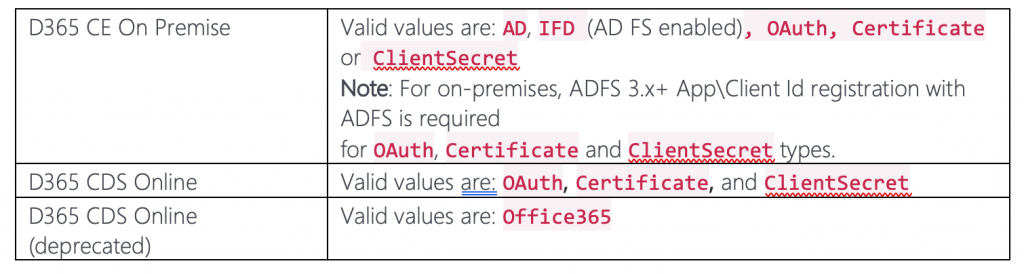
The connection string specifies the authentication type and the details required by your chosen method. Compare the parameters in Microsoft’s connection-string documentation.
Hope this helps to achieve your goal.